How to Install and Set Up MSIX and MSIXBundle Packages on Windows
Microsoft introduced MSIX as a modern application packaging format to improve on the older APPX package format and offer a more robust, reliable deployment experience for business apps. MSIX combines the best features of MSI, APPX, App‑V, and ClickOnce, while providing better install reliability, update handling, and clean uninstall behavior. (Microsoft Learn)
📌 What Are MSIX and MSIXBundle?
MSIX is a modern Windows app package format that delivers a consistent install and update experience across Windows devices. It preserves existing package functionality while adding new features such as optimized network use and cleaner installs. (Microsoft Learn)
MSIXBundle packages contain multiple MSIX or APPX packages bundled together — often used for supporting different architectures, languages, or optional components in one file. (Reddit)
✅ Step 1 — Ensure App Installer Is Installed
Windows includes App Installer, a built‑in component that handles MSIX and MSIXBundle installations with a graphical interface. If it’s missing or outdated:
- Open Microsoft Store.
- Search for App Installer.
- Install or update it. (Microsoft Learn)
👉 App Installer lets you install MSIX packages with a simple double‑click or via winget (winget upgrade Microsoft.AppInstaller). (Microsoft Learn)
📥 Step 2 — Install an MSIX or MSIXBundle Package
There are two common ways to install MSIX/MSIXBundle packages:
🖱️ A. Using App Installer
- Locate the
.msixor.msixbundlefile on your machine. - Double‑click it.
- Click Install in the App Installer window.
This method works for local installs or enterprise deployment files. (Microsoft Learn)
📦 B. Using PowerShell
You can install packages silently or on multiple machines with PowerShell:
Add-AppxPackage -Path "C:\Path\To\App.msix"
This works for .msix and .msixbundle files alike. (Add your own detailed reference link here)
🛠️ Step 3 — Deploy in an Enterprise Environment
For large‑scale deployment, use management tools like:
- Microsoft Intune — create and deploy MSIX apps to devices or user groups. (Microsoft Learn)
- Microsoft Endpoint Configuration Manager — automatically configure installs and metadata for MSIX packages. (Microsoft Learn)
These tools pull package metadata (e.g., app name, version) and manage installation consistently across endpoints. (Microsoft Learn)
📌 Tips for Admins
- Sideloading is enabled by default in modern Windows, so local installation of signed MSIX apps is straightforward. (Microsoft Learn)
- Always ensure the package is digitally signed to avoid install errors.
- For custom deployment scenarios or automation, combine PowerShell and management tools.
🔗 Reference and Further Reading
Official Documentation & Guides
- MSIX overview and basics — Learn how MSIX works and its benefits. (Microsoft Learn)
- Managing MSIX deployments in enterprise — Tips for Intune and Configuration Manager. (Microsoft Learn)
- Install and update App Installer — How to ensure App Installer is present and working. (Microsoft Learn)
Additional Resources
- Understanding MSIX vs. APPX packaging — Differences and compatibility. (Microsoft Learn)
- MSIX Packaging Tool overview (convert existing apps) — Tools for creating MSIX from legacy installers. (Microsoft Learn)
While there are many methods that IT departments can use to deploy business applications, none of them has the simplicity, lack of bloat and level of control that MSIX packages provide. IT administrators need a firm understanding of what MSIX packages are and how to deploy them so that they can manage applications across a fleet of Windows devices safely and effectively.
What is an MSIX package?
The MSIX package format provides a modern packaging format that IT can use to deploy basically any type of Windows app or framework. More importantly, it also enables IT to always stay up to date. Compared with previous iterations, however, MSIX packages bring great installation reliability and decrease the load on the network bandwidth. The format is also quite efficient with disk space, as there is no duplication of files.
One of the main strengths of an MSIX package is how it provides the IT administrator with different layers within the package. With that, it provides flexibility for IT. From a high-level perspective, a package contains two different layers:
- The package payload. The application files themselves.
- The footprint files. The payload files.
Together, these layers ensure that IT can easily validate, manage, deploy and update the package.
What is an msixbundle?
An MSIX bundle is essentially a bundle of multiple MSIX packages. The most common use for an MSIX bundle is when IT is working with multiple architectures — x86 and x64 — and managing a large array of applications. They can also be helpful when working with multiple languages.
In those cases, an MSIX bundle provides a smoother distribution of the packages and works better in combination with Windows. Windows can determine the required architecture for each app and will only download the required files for that architecture. This reduces unnecessary bloat from the underlying system, which was a problem with the previous MSI format.
An MSIX bundle often contains three different layers:
- The architecture. The application files for the different architectures.
- The resource files. The aspects of that application that might require customization, such as the language files.
- The footprint files. The payload files.
These layers ensure that the bundle facilitates faster uploads, publishing and development, and ultimately reduce the number of MSIX packages that IT needs to deploy.
How to install msixbundle files
How to Install and Deploy MSIX and MSIXBundle Packages on Windows
📦 Understanding MSIX Bundle Isolation
Before installing an MSIX bundle, be aware that each MSIX package runs in its own isolated container. This containerization ensures that a package’s payload does not interfere with other applications on the system, providing a more reliable and conflict‑free deployment experience for IT administrators. (learn.microsoft.com)
🛠️ Manual vs. Automated MSIX Deployment
🖱️ Manual Installation
IT administrators can manually install an MSIX or MSIXBundle by double‑clicking the package and allowing the Windows App Installer to handle the install. This method is straightforward but time‑consuming for multiple devices. (learn.microsoft.com)
💻 Using PowerShell for MSIX Deployment
To automate MSIX installation, use PowerShell cmdlets, which are built‑in and support both .msix and .msixbundle files. Microsoft provides a set of MSIX/APPX cmdlets that make scripted deployments possible. (learn.microsoft.com)
🔧 Common PowerShell Cmdlets
| Cmdlet | Function |
|---|---|
Get-AppxPackage | Lists installed MSIX and APPX packages on the device. |
Add-AppxPackage | Installs an MSIX or APPX package. |
Remove-AppxPackage | Uninstalls an MSIX or APPX package. |
| (These cmdlets have aliases that also work with MSIX bundles.) (Microsoft Learn) |
📌 Example Commands
# Install an MSIX package
Add-AppxPackage -Path ".\ExamplePackage.msix"

# List all installed packages for all users
Get-AppxPackage -AllUsers
This allows IT administrators to automate installation and inventory checks via scripts rather than clicking manually on each machine. (Microsoft Learn)
📈 Enterprise Deployment with Microsoft Intune
For large‑scale deployments, most organizations use a device management platform like Microsoft Intune, which simplifies MSIX distribution across managed endpoints.
🚀 Deploying MSIX via Intune
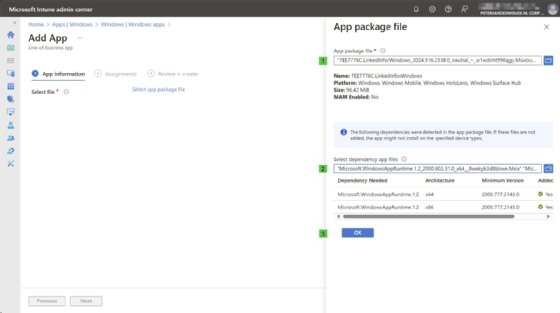
- Open the Microsoft Intune admin center.
- Navigate to Apps > Windows.
- Click Create and select Line‑of‑business app as the app type.
- On the App information page, upload your MSIX or MSIXBundle package.
- Customize settings as needed.
- On the Assignments page, choose users or devices to target.
- Review and click Create to deploy. (Microsoft Learn)
Intune automatically retrieves metadata from the MSIX package (such as app name and version), making it easier to manage at scale. (Microsoft Learn)
📌 Tips for Successful MSIX Deployment
- Containerization helps prevent conflicts with other installed software. (Microsoft Learn)
- Ensure packages are signed with trusted certificates so installations succeed without errors. (Microsoft Learn)
- Use device management tools like Intune or Configuration Manager to streamline deployment and updates. (Microsoft Learn)
🔗 Outbound References & Further Reading
- Managing MSIX with PowerShell Cmdlets — Microsoft documentation on PowerShell MSIX management. MSIX PowerShell Cmdlets documentation (Microsoft Learn)
- Deploy MSIX apps via Intune — Step‑by‑step guide on using Intune to deploy MSIX packages. Microsoft Intune MSIX deployment guide (Microsoft Learn)
- MSIX App Distribution Overview — How to distribute MSIX using enterprise tools. MSIX enterprise distribution overview (Microsoft Learn)
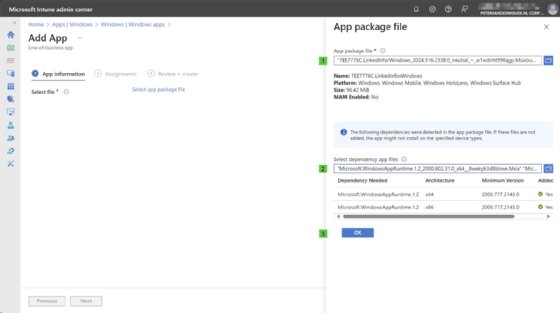
Figure 1. The MSIX utility within Microsoft Intune.
After the admin completes these steps, Intune will automatically distribute the MSIX bundle to the specified users or devices within the organization. This also lets IT keep track of the deployment status with a centralized view of the Windows fleet.
Peter van der Woude works as a mobility consultant and knows the ins and outs of the Configuration Manager and Microsoft Intune tools. He is a Microsoft MVP and a Windows expert.